
Short answer
SpotMax handles progressive overload with its Progression Plan. You climb the rep range first; once every set reaches the top, SpotMax adds weight for next session, usually 5 lb or 2.5 kg. After two stalled sessions it offers a 10% ease-off. The new targets appear on the completion screen, ready for next time.
How does SpotMax decide when to add weight?
Reps first, then weight: the weight goes up once every working set reaches the top of its rep range.
Each exercise has a rep range, such as 8–10. While you're inside the range, SpotMax keeps the weight and asks for more reps. When every set hits the top of the range in one session, next session's target moves up one step and the reps reset to the bottom. That pattern is often called double progression. If you want the theory behind it, read what progressive overload is; this page covers how SpotMax applies it.
The Progression Plan is on by default and applies to every routine, including the ones the AI program generator builds. You can switch it off in Settings.
How big each step is
- Most exercises
- +5 lb, or +2.5 kg in kilogram mode.
- Barbell squat, barbell deadlift, leg press
- +10 lb, or +5 kg.
- Lifting lighter than planned
- The plan follows you down instead of holding a target you didn't reach.
- Two stalled sessions
- SpotMax offers a 10% ease-off. It's an offer, never forced.
What does that look like over ten bench sessions?
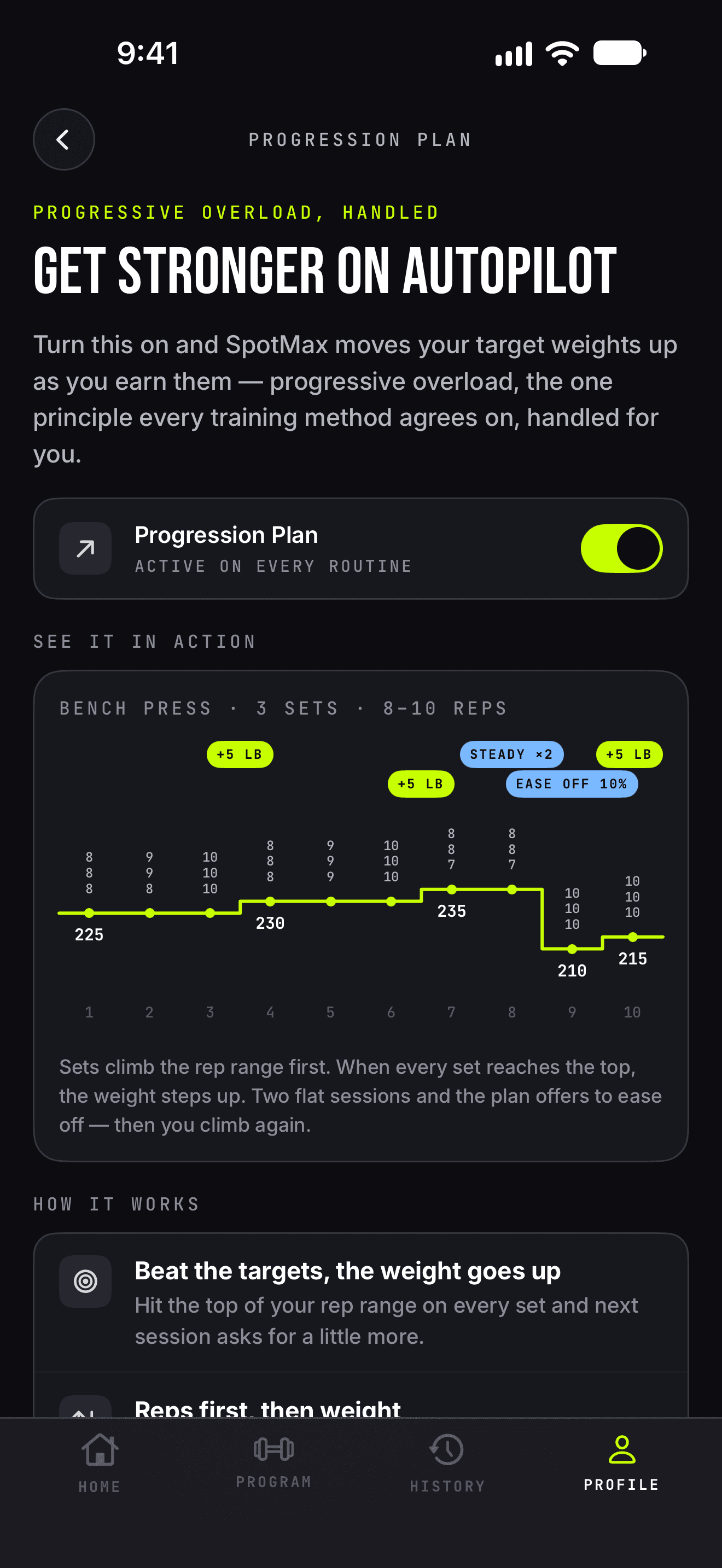
Here's the example SpotMax itself shows: 3 sets of 8–10 on bench press, starting at 225 lb.
| Session | Weight | Reps per set | What SpotMax does next |
|---|---|---|---|
| 1 | 225 lb | 8, 8, 8 | Keep 225, aim for more reps |
| 2 | 225 lb | 9, 9, 8 | Keep 225 |
| 3 | 225 lb | 10, 10, 10 | Every set at the top: +5 lb |
| 4 | 230 lb | 8, 8, 8 | Keep 230 |
| 5 | 230 lb | 9, 9, 9 | Keep 230 |
| 6 | 230 lb | 10, 10, 10 | +5 lb |
| 7 | 235 lb | 8, 8, 7 | Keep 235 |
| 8 | 235 lb | 8, 8, 7 | Second flat session: offer EASE OFF 10% |
| 9 | 210 lb | 10, 10, 10 | +5 lb, climbing again |
| 10 | 215 lb | 10, 10, 10 | Keep climbing |
Swipe the table sideways to see every column.
Ease-off: 10% off 235 lb, rounded to a weight you can load (210 lb).
- You
“Yo Maxa, 230 for 8.”
230 lb is the target SpotMax set after session three.
- SpotMaxLogged
Logged, 230 for 8.
- SpotMax
Next set: 230 for 8.
Back at the bottom of the 8–10 range, climbing again.
Where do you see next session's targets?
On the completion screen, under NEXT SESSION'S TARGETS, as soon as you finish the workout.
The list shows what changed for each exercise. If a change doesn't suit you (say you know next week is a light week), tap undo and the old target stays. When a lift has stalled twice, the same screen shows the EASE OFF 10% button. Tap it and next session starts lighter; ignore it and nothing changes.
When the next session starts, the new numbers are already filled in, and SpotMax reads them out as you go: Next set: 230 for 8.
You never work out the next weight yourself, and you don't need to remember what you lifted last time.
What rep range does SpotMax use for each goal?
New exercises get a rep range from your training goal, and that range decides when the weight goes up.
| Goal | Default rep range |
|---|---|
| Powerlifting | 3–5 |
| Strength | 4–6 |
| Build muscle | 8–12 |
| Lose weight | 10–15 |
| Endurance | 15–20 |
| No goal set | 8–10 |
You can change any exercise's rep range in the routine editor.
How does SpotMax pick a starting weight or handle a break?
History first; with no history it starts conservatively by equipment, and after a long break it starts you lighter.
- No history yet: an empty bar for barbell lifts, 15 lb (7.5 kg) dumbbells, 20 lb (10 kg) on a cable, 40 lb (20 kg) on a machine, a 20 lb (8 kg) kettlebell, and nothing added for bodyweight work.
- More than 14 days since you last did the lift: the starting target drops about 5%.
- More than 28 days: it drops about 10%.
- Always loadable: every target is rounded to a weight you can actually put on the bar or pick off the rack.
How is this different from auto-adjust?
The Progression Plan works between sessions; auto-adjust works within one session.
Progression sets next week's numbers from this week's results. Auto-adjust changes the rest of today's sets when one set goes much better or worse than planned. They work together: an easy day can raise today's sets, and a full session at the top of the range raises next week's. If you've been stuck for months, the strength plateau page shows how both help.
More in Features.