
Short answer
SpotMax tracks supersets for you. Say “superset this with rows” mid-workout, ask the coach, or build one in the routine editor, and SpotMax rotates you through the exercises automatically. You get 10 seconds to change station between lifts and one shared rest after each round, and SpotMax announces every move.
- You
“Yo Maxa, superset this with rows.”
- SpotMaxSuperset A
Superset — Barbell Bench Press with Barbell Row. Next, Barbell Bench Press: 185 for 8.
- You
“Yo Maxa, 185 for 8.”
- SpotMax
Logged, 185 for 8.
- SpotMax
No rest — Barbell Row: 135 for 10.
10 seconds to walk to the row station.
- You
“Yo Maxa, 135 for 10.”
- SpotMax
Logged, 135 for 10.
- SpotMax
Next, Barbell Bench Press: 185 for 8.
Round one done. The shared rest starts now.
- You
“Yo Maxa, break the superset.”
Two rounds later.
- SpotMax
Superset off — Barbell Row on its own.
How do you create a superset in SpotMax?
Three ways: say it, ask the coach, or set it up on screen in the workout or the routine editor.
| Method | How | Lasts |
|---|---|---|
| Voice command | superset this with rowspairs the lift you're on with another | Today's workout |
| AI coach | Ask in your own words, by voice or typed | Today's workout |
| Workout screen | Pair two exercises on the workout screen | Today's workout |
| Routine editor | Group exercises when you build or edit a routine | Every time you run that routine |
A superset made during a workout leaves the saved routine untouched.
If the partner isn't in today's workout yet, SpotMax adds it from the exercise catalog and says so: Added Barbell Row.
Pair a third exercise with one that's already in a superset and it joins the same group, which is how you build a tri-set or giant set. Groups are lettered A, B and so on, in workout order.
Generated plans can include supersets too. The AI workout generator sometimes pairs accessories to save time, and the preview shows them grouped before you start.
How does SpotMax rotate through a superset?
It works round by round: one set of each exercise in order, then rest, then the next round, and it always tells you which lift is next.
- Mid-round: after a set, you hear
No rest —
and the next exercise with its target. You have 10 seconds to change station. - End of a round: you hear the first exercise of the next round, and the shared rest starts.
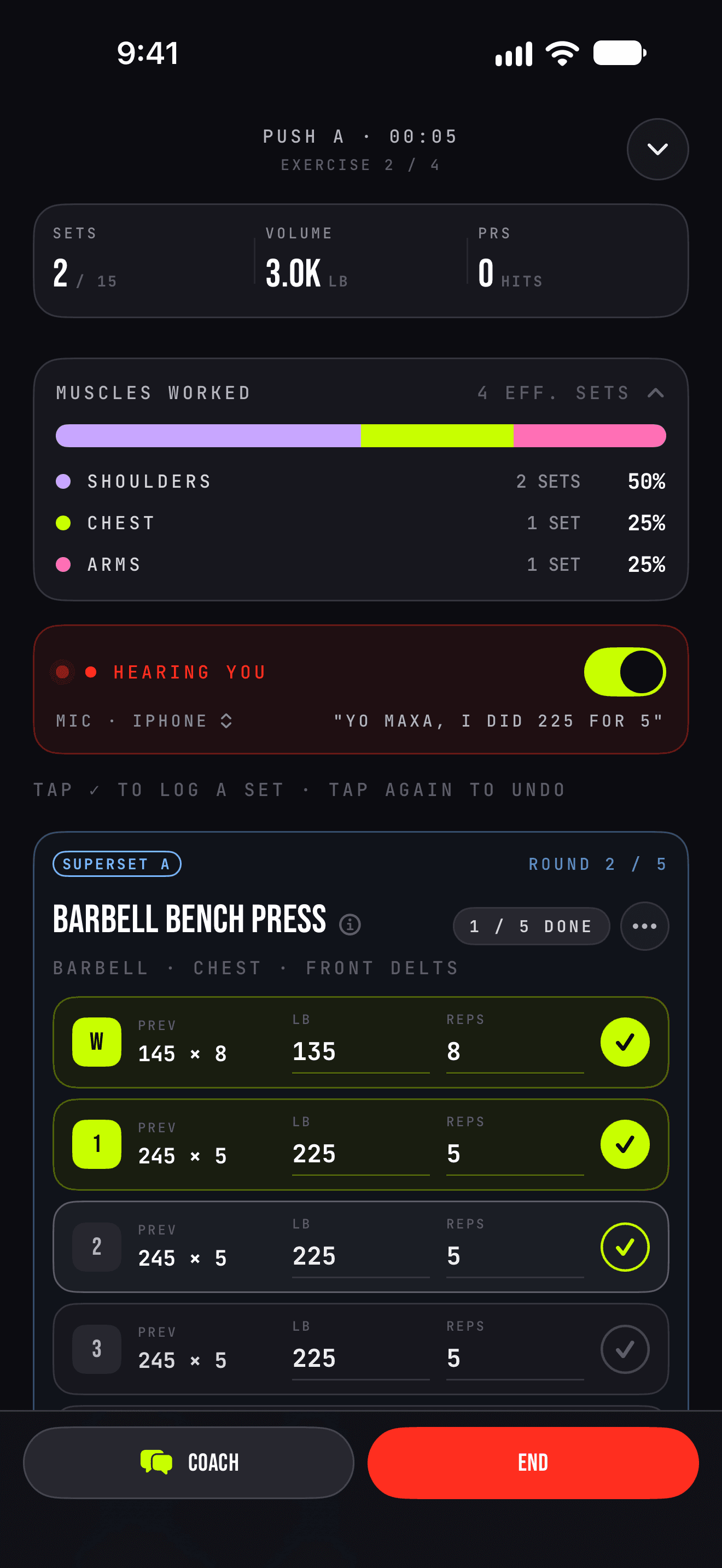
- Round counter: the workout screen shows ROUND 2 / 5, and the Lock Screen Live Activity reads like
SUPERSET A · ROUND 2 OF 3 · SET 2
. - Uneven set counts: if one exercise has more sets than its partner, the rotation carries on with what's left.
- Out-of-order sets: tap a set in early or leave a gap, and SpotMax hands back the missed set before starting a fresh round.
How does rest work in a superset?
The group shares one rest, taken after each full round, and it starts at the longest rest of the exercises in the group.
Pair bench (2:00 rest) with rows (1:30) and the round rest is 2:00. Tap the rest bar to change it for the group, down to 15 seconds. That group rest lasts for today's session only; each exercise keeps its own rest in the routine. The general timer behaviour is on the rest timer page.
Which commands fix superset mistakes?
break the superset
splits the lift you're on back out, and SpotMax tells you when a request doesn't make sense.
- Split one out
break the superset
answersSuperset off — Barbell Row on its own.
A group left with one exercise dissolves.- Already paired
- SpotMax says
Those are already supersetted
. - Same lift twice
- SpotMax says
That's the same exercise
. - Not in a superset
break the superset
on a solo lift getsThat's not in a superset
.
Supersets FAQ
Can I superset three or more exercises?
Yes. Pair another exercise with one that's already in a superset and it joins the group, making a tri-set or giant set.
Will a superset I make by voice be there next time?
No. Voice and coach supersets last for today's workout. To keep one, group the exercises in the routine editor.
More in Features.