
Short answer
SpotMax remembers what you lifted last time so you don't have to. Each set row shows last session's numbers, the Progression Plan turns them into today's targets, and mid-workout you can ask “Yo Maxa, how much did I do last time?” and hear the answer in your headphones.
Why is last week's weight so hard to remember?
Because a single session produces 30 to 40 numbers, and most of them change every week.
Five exercises, three or four sets each, a weight and a rep count per set: that's up to 40 numbers for one workout. Train three or four times a week and you're juggling well over a hundred, all shifting slowly. Nobody holds that in their head, which is why “I never remember what I lifted last week” is one of the five problems SpotMax was built around.
When you can't remember, one of two things happens. You play it safe and repeat the same weight for months, or you guess high and miss reps. Both stall progress. The usual fixes each have a catch: a notebook works but means flipping pages and doing arithmetic between sets; a notes app turns into an unsearchable wall of text; a photo of last week's whiteboard only helps if you took one.
Where does SpotMax show what you did last time?
In the workout itself, next to every set, so you never have to go looking.
- PREV column
- Each set row in the active workout shows the previous session's numbers for that set, like 145×8, right beside today's weight and reps.
- Today's targets
- The weight and reps for each set are already filled in from your last session by the Progression Plan.
- Exercise stats
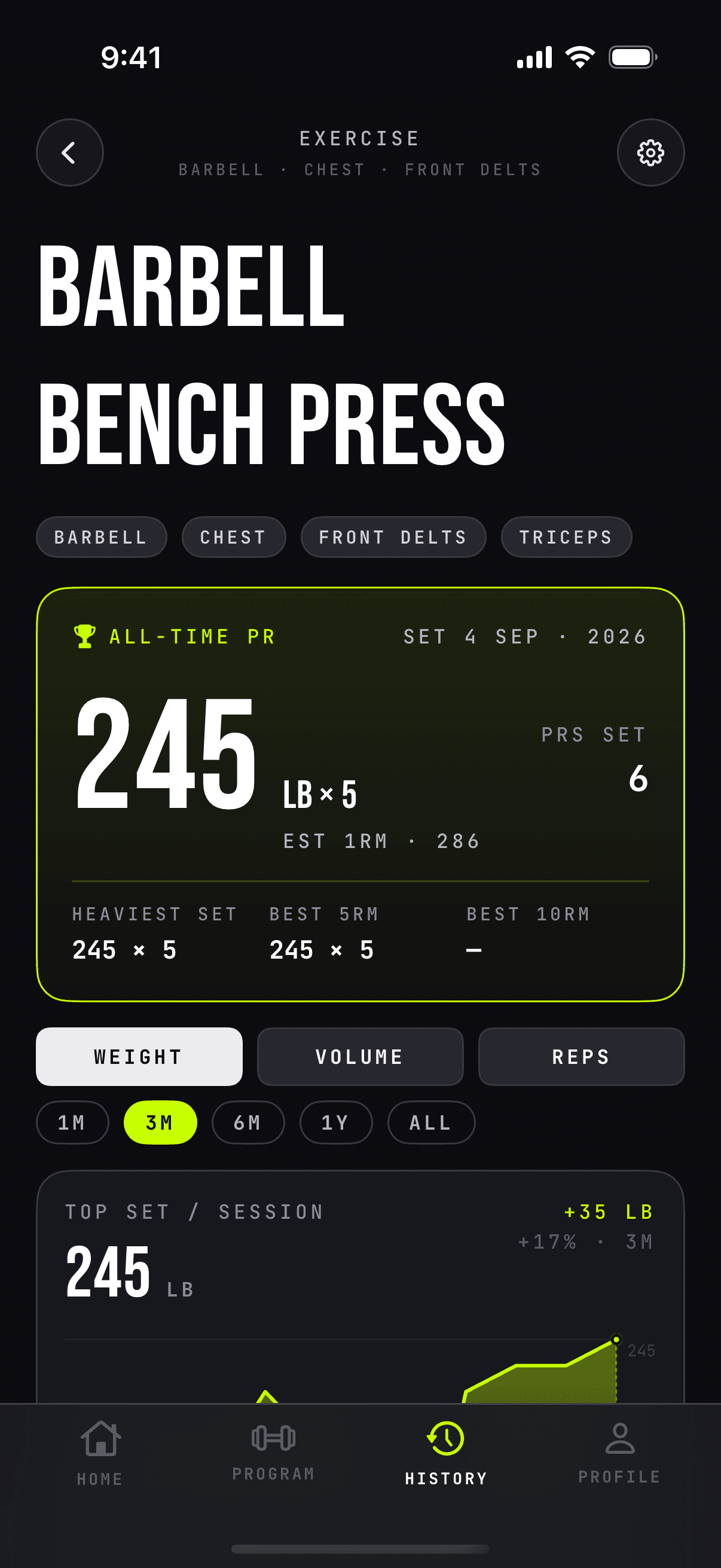
- Tap any lift for its all-time PR, estimated 1RM, best 5-rep and 10-rep sets, top set per session over time, set history and notes.
- Workout history
- Every finished session, with muscles worked, PRs and each set, in the History tab.
- You
“Yo Maxa, how much did I do last time?”
- SpotMaxCoach
Last time on barbell row you did 135 for 10, 10 and 9.
Example reply. The AI coach words it differently each time; the numbers come from your logged sets.
- You
“Yo Maxa, 135 for 10.”
- SpotMax
Logged, 135 for 10.
- SpotMax
Next set: 135 for 10.
How does SpotMax turn last time into this time?
The Progression Plan reads your last session and writes the next one: add reps until every set reaches the top of the range, then add weight.
| Session | What you lifted | What SpotMax plans next |
|---|---|---|
| 1 | 135 × 10, 9, 8 | Same weight, chase more reps |
| 2 | 135 × 10, 10, 9 | Same weight, one set still short of 10 |
| 3 | 135 × 10, 10, 10 | Every set hit 10: 140 lb, back to 8 reps |
| 4 | 140 × 8, 8, 8 | Same weight, build toward 10 again |
Steps are +5 lb (2.5 kg), or +10 lb (5 kg) on barbell squat, barbell deadlift and leg press.
You see these targets on the completion screen under “Next session's targets”, and you can undo any of them. If you lift lighter than planned, the plan follows you down instead of insisting on a number you didn't hit. The theory behind this “double progression” is in the progressive overload guide.
What happens after a few weeks off?
SpotMax starts you a little lighter: starting weights account for breaks of 14 days and of 28 days or more.
Coming back from a holiday and loading last month's numbers is a classic way to miss every rep. SpotMax checks how long it's been since you last did a lift. After about two weeks away it trims the starting weight slightly, and after four weeks or more it trims it further, so your first session back is a realistic one. From there the normal reps-then-weight climb takes over.
Does SpotMax remember everything forever?
Your logged sets stay on your phone, but the AI coach only remembers the conversation within one workout.
Remembering last time: questions
Does SpotMax tell me if I'm close to a PR?
It calls a PR live when you set one,
New PR! 245 for 5.
, based on your heaviest working weight. It doesn't announce how far you are from one. See the PR tracker.Can I see my estimated max?
Yes. Each exercise shows an estimated 1RM (Epley) and its trend. To calculate one by hand, use the 1RM calculator.
Can I ask about last time without the coach?
Yes. The PREV column shows it on screen, and it works offline, unlike the coach.
More in Use cases.